
jju71 님의 블로그
YOLO_Segmentation 본문
1. Segmentation
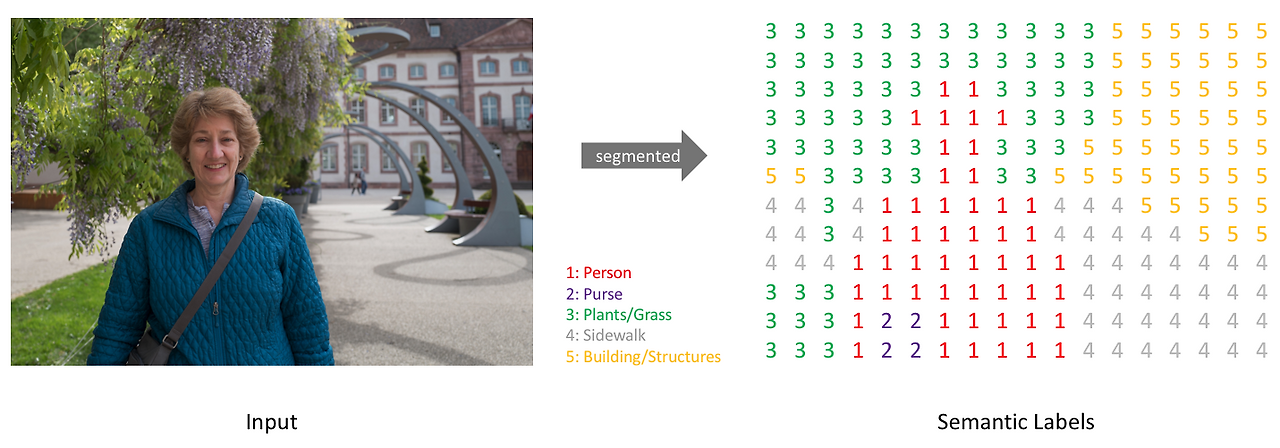
Segmentation은 컴퓨터 비전에서 이미지나 영상을 픽셀 단위로 분할하여 각 영역이 무엇을 나타내는지 구분하는 기술입니다. 이는 크게 Semantic Segmentation과 Instance Segmentation으로 나뉘는데, Semantic Segmentation은 같은 종류의 객체를 동일한 클래스로 분류하는 반면, Instance Segmentation은 같은 클래스 내에서도 개별 객체를 구분합니다. 이를 통해 의료 영상 분석, 자율주행, 위성 이미지 처리 등 다양한 분야에서 정밀한 객체 인식을 수행할 수 있습니다. Segmentation 모델로는 U-Net, DeepLab, Mask R-CNN 등이 널리 사용됩니다.
icrawler
python3 -m pip install icrawler
파이썬 환경에서 웹상의 이미지를 손쉽게 크롤링할 수 있도록 도와주는 모듈식 이미지 크롤링 프레임워크
2. 스타벅스 데이터셋
COCO JSON
- images: 이미지 ID, 파일명, width, height
- annotation: 객체의 category, polygon, bbox 등
- categories: 클래스 ID와 이름
import json
import random
import shutil
from collections import Counter
from pathlib import Path

import cv2
import matplotlib.pyplot as plt
import numpy as np
import torch
import ultralytics
import yaml

from ultralytics import YOLO
# 경로 설정
PROJECT_ROOT = Path.cwd() # 현재 위치, 현재 폴더
DATA_ROOT = PROJECT_ROOT / "data"
SOURCE_DIR = DATA_ROOT / "starbucks"
YOLO_ROOT = DATA_ROOT / "Starbucks_YOLO"
COCO_JSON = SOURCE_DIR / "instances_default.json"
print("PROJECT_ROOT: ", PROJECT_ROOT)
print("SORUCE_DIR: ", SOURCE_DIR)
print("YOLO_ROOT: ", YOLO_ROOT)
print("COCO_JSON: ", COCO_JSON)# 파일 읽어서 내용 불러오기
with COCO_JSON.open("r", encoding='utf-8') as f:
coco_data = json.load(f)
coco_data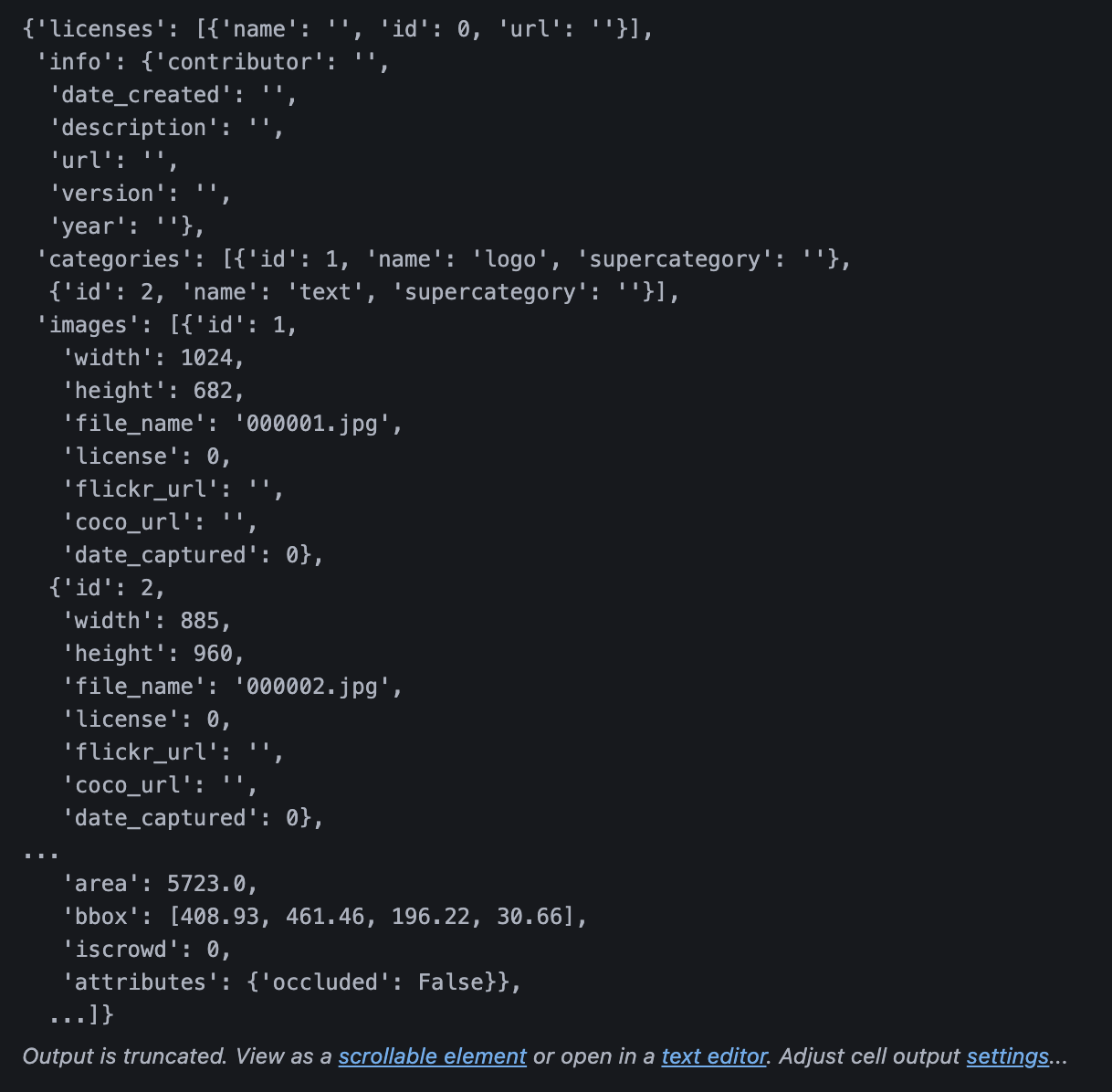
# category ID가 반드시 연속이라는 보장이 없으니까 확인해보려고
categories = sorted(coco_data['categories'], key=lambda x: x['id'])

# 매핑
COCO_ID_TO_YOLO_ID = {
    category['id']: yolo_id for yolo_id, category in enumerate(categories)
}

CLASS_NAMES = [category['name'] for category in categories]

print('이미지 수: ', len(coco_data['images']))
print('Annotation 수: ', len(coco_data['annotations']))
print('클래스: ', CLASS_NAMES)
print('ID 매핑: ', COCO_ID_TO_YOLO_ID)
------------------------------------------------------------------
이미지 수:  612
Annotation 수:  1296
클래스:  ['logo', 'text']
ID 매핑:  {1: 0, 2: 1}
이미지와 Annotation 확인
- JOSN에 등록된 이미지가 실제 폴더에 모두 존재하는지 확인
- 클래스별 annotation 수를 확인하면 특정 클래스가 지나치게 적은지도 확인할 수 있음
image_info_by_id = { image_info['id']: image_info for image_info in coco_data['images'] }

# 빠져있는 것들
missing_images = []

for image_info in coco_data['images']:
    image_path = SOURCE_DIR / image_info['file_name']
    if not image_path.exists():
        missing_images.append(image_info['file_name'])

class_counts = Counter(
    COCO_ID_TO_YOLO_ID[ann['category_id']] for ann in coco_data['annotations']
    if ann['category_id'] in COCO_ID_TO_YOLO_ID)

print("누락 이미지 수: ", len(missing_images))
if missing_images:
    print(missing_images)

for class_id, class_name in enumerate(CLASS_NAMES):
    print(f'{class_id}: {class_name} > {class_counts[class_id]} annotations')
---------------------------------------------------------------
누락 이미지 수:  0
0: logo > 933 annotations
1: text > 363 annotations
COCO Polygon Annotation 시각화
- COCO Polygon Annotation의 좌표
[x1, y1, x2, y2, x3, y3, x4, y4, ...]
최소 3개의 점을 연결하여 객체 외곽을 표현
# 이미지 읽어오기
def load_rgb_image(image_path: Path):
    image_bgr = cv2.imread(str(image_path))
    if image_bgr is None:
        raise FileNotFoundError(f'이미지를 읽을 수 없습니다: {image_path}')
    return cv2.cvtColor(image_bgr, cv2.COLOR_BGR2RGB)
# 파일에 대한 객체를 띄우고 좌표 정보를 불러와서 polyline으로 각 점을 연결해서 찍어줌
import cv2
def visualize_coco_annotation(image_id: int):
image_info = image_info_by_id.get(image_id)
if image_info is None:
raise ValueError(f"존재하지 않는 image_id입니다: {image_id}")
image = load_rgb_image(SOURCE_DIR / image_info['file_name']).copy()
for ann in coco_data['annotations']:
if ann['image_id'] != image_id:
continue
class_id = COCO_ID_TO_YOLO_ID[ann['category_id']]
class_name = CLASS_NAMES[class_id]
for polygon in ann.get("segmentation", []):
if not isinstance(polygon, list) or len(polygon) < 6: # len(polygon)이 6이면 좌표가 3개밖에 없는 것임
continue
points = np.array(polygon, dtype=np.float32).reshape(-1, 2).astype(np.int32) # polygon을 ndarray로 변경, reshape의 -1은 숫자를 2개씩 잡을 때 없으면 너가 자동으로 숫자를 잡아라
cv2.polylines(image, [points], True, (0, 255, 0), 2)
x, y = points[0]
cv2.putText(image, class_name, (int(x), max(20, int(y) - 5)), cv2.FONT_HERSHEY_SIMPLEX, 0.6, (255, 0, 0), 2)
plt.figure(figsize=(8,6))
plt.imshow(image)
plt.axis('off')
plt.title(f"COCO Annotation - {image_info['file_name']}")
plt.show()visualize_coco_annotation(81)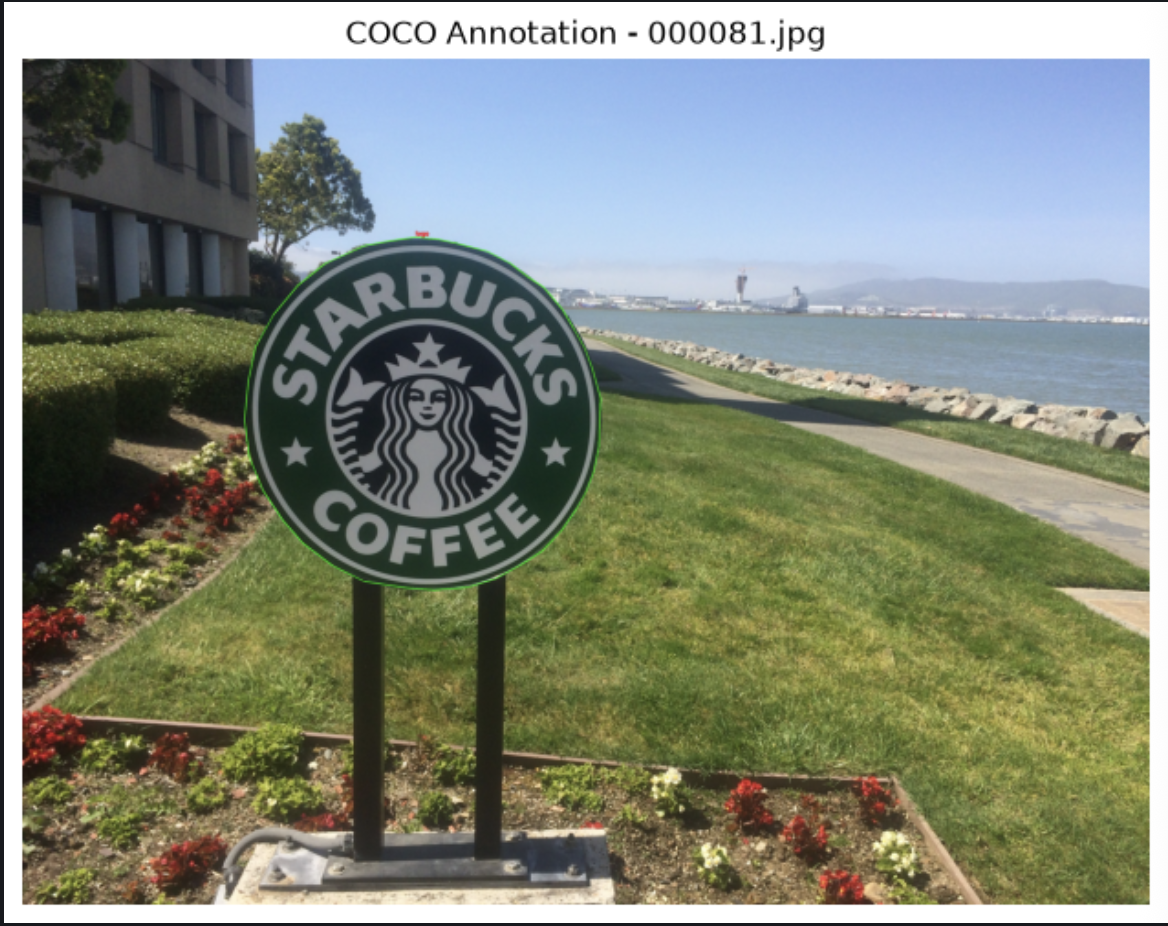
COCO > YOLO Segmentation 변환
YOLO Segmentation 라벨
class_id x1 y1 x2 y2 x3 y3 ...
좌표는 픽셀 값이 아니라 0 ~ 1 사이로 정규화
- x_norm = x / image_width
- y_norm = y / image_height
# COCO Polyon 객체 세그멘테이션 좌표를 YOLO Segmentation 변환 후 정규화
def coco_polygon_to_yolo_line(class_id, polygon, image_width, image_height):
    if not isinstance(polygon, list) or len(polygon) < 6:
        return None

    if len(polygon) % 2 != 0 :
        return None

    normalized_values = []

    for i in range(0, len(polygon), 2):
        x = polygon[i]
        y = polygon[i + 1]
        x_norm = x / image_width
        y_norm = y / image_height

		# 좌표 정규화
        x_norm = min(max(x_norm, 0.0), 1.0)
        y_norm = min(max(y_norm, 0.0), 1.0)

        normalized_values.extend([x_norm, y_norm])

	# YOLO 포맷 문자열 생성
    coordinates = " ".join(f'{value:6f}' for value in normalized_values)
    return f'{class_id} {coordinates}'
train / val / test 분할
SEED = 2026
TRAIN_RATIO = 0.6
VAL_RATIO = 0.2

random.seed(SEED)

all_images = [image_info for image_info in coco_data['images']
            if(SOURCE_DIR / image_info['file_name']).exists()]

random.shuffle(all_images)
num_images = len(all_images)
num_train = int(num_images * TRAIN_RATIO)
num_val = int(num_images * VAL_RATIO)

# 범위 쪼개기
train_images = all_images[:num_train]
val_images = all_images[num_train:num_train+num_val]
test_iamges = all_images[num_train+num_val:]

print('전체: ', num_images)
print('train: ', len(train_images))
print('val: ', len(val_images))
print('test: ', len(test_iamges))
--------------------------------------------------------
전체:  612
train:  367
val:  122
test:  123
YOLO 폴더 구조 생성
- YOLO의 명확한 구조는 이미지와 라벨을 분리하는 방식
- 예) images / train / starbucks11.jpg > labels / train / starbucks11.txt
def prepare_yolo_split(split_name, split_images):
    image_output_dir = YOLO_ROOT / "images" / split_name
    label_output_dir = YOLO_ROOT / "labels" / split_name

    image_output_dir.mkdir(parents=True, exist_ok=True)
    label_output_dir.mkdir(parents=True, exist_ok=True)

    # 재실행할 때 과거 파일이 남아 섞이는 것을 방지
    for old_file in image_output_dir.iterdir():
        if old_file.is_file():
            old_file.unlink()

    for old_file in label_output_dir.iterdir():
        if old_file.is_file():
            old_file.unlink()

    annotations_by_image = {}

    for ann in coco_data['annotations']:
        annotations_by_image.setdefault(ann['image_id'], []).append(ann)

    for image_info in split_images:
        image_id = image_info['id']
        image_width = image_info['width']
        image_height = image_info['height']
        file_name = image_info['file_name']

        shutil.copy2(SOURCE_DIR / file_name , image_output_dir / file_name) # 왼쪽에서 오른쪽 파일로 복사

        yolo_lines = []

        for ann in annotations_by_image.get(image_id, []):
            coco_category_id = ann['category_id']
            if coco_category_id not in COCO_ID_TO_YOLO_ID:
                continue
            class_id = COCO_ID_TO_YOLO_ID[coco_category_id]
            segmentation = ann.get('segmentation', [])

            if not isinstance(segmentation, list):
                continue

            for polygon in segmentation:
                yolo_line = coco_polygon_to_yolo_line(
                    class_id, polygon, image_width, image_height
                )

                if yolo_line is not None:
                    yolo_lines.append(yolo_line)

        label_path = label_output_dir / f'{Path(file_name).stem}.txt'

        if yolo_lines:
            label_path.write_text("\n".join(yolo_lines), encoding='utf-8')
prepare_yolo_split("train", train_images)
prepare_yolo_split("val", val_images)
prepare_yolo_split("test", test_iamges)
print("COCO > YOLO Segmentation 변경 완료")
---------------------------------------------
COCO > YOLO Segmentation 변경 완료YOLO txt 라벨 다시 시각화
- COCO JSON이 아니라 변환된 YOLO txt를 읽어서 polygon을 그림
# 이미지 > YOLO txt 읽어서 > polygon
def visualize_yolo_label(split_name, image_name):
    image_path = YOLO_ROOT / "images" / split_name / image_name
    label_path = YOLO_ROOT / "labels" / split_name / f"{Path(image_name).stem}.txt"

    image = load_rgb_image(image_path).copy()
    height, width = image.shape[:2]

    if not label_path.exists():
        raise FileNotFoundError(f"라벨이 없습니다: {label_path}")

    for line in label_path.read_text(encoding='utf-8').splitlines():
        values = line.split() # 하나씩 떼어내서 리스트로 집어넣음
        class_id = int(values[0])
        points = np.array(list(map(float, values[1:])), dtype=np.float32).reshape(-1, 2) # ndarray로 가져오면 reshape할 수 있음
        points[:, 0] *= width # txt 파일에서 두개가 짝인데 첫번쨰가 width, width를 곱해주면 원래대로 복원
        points[:, 1] *= height
        points = points.astype(np.int32)

        cv2.polylines(image, [points], True, (0, 255, 0), 2)

        x, y = points[0]
        cv2.putText(image, CLASS_NAMES[class_id], (int(x), max(20, int(y) - 5)), cv2.FONT_HERSHEY_SIMPLEX, 0.6, (255, 0, 0), 2)

        plt.figure(figsize=(8,6))
        plt.imshow(image)
        plt.axis('off')
        plt.title(f"COCO Annotation - {image_info['file_name']}")
        plt.show()
sample_train_image = train_images[0]['file_name']
print('확인 이미지: ', sample_train_image)
visualize_yolo_label("train", sample_train_image)
--------------------------------------------
확인 이미지: 000064.jpg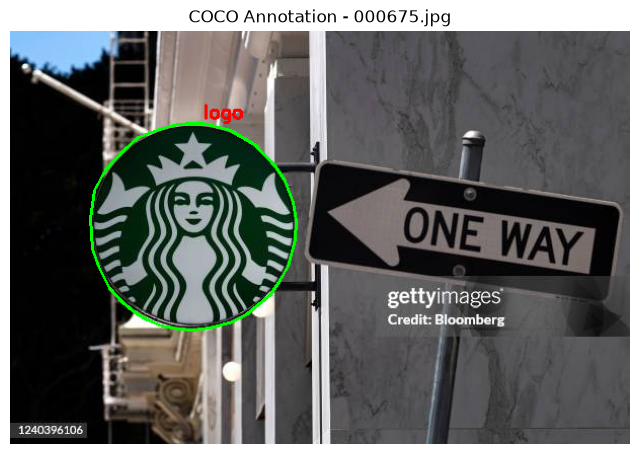
YOLO 데이터셋 YAML 생성
- 0: logo
- 1: text
yaml_data = {
    "path": str(YOLO_ROOT.resolve()),
    "train": "images/train",
    "val": "images/val",
    "test": "images/test",
    "names": {
        class_id: class_name for class_id, class_name in enumerate(CLASS_NAMES)
    }
}

YAML_PATH = YOLO_ROOT / "starbucks.yaml"

# 파일 만들기
with YAML_PATH.open("w", encoding='utf-8') as f:
    yaml.safe_dump(yaml_data, f, allow_unicode=True, sort_keys=False)

print(YAML_PATH.read_text(encoding="utf-8"))
---------------------------------------------------
path: /Users/juyeong/KDT/11_CV/data/Starbucks_YOLO
train: images/train
val: images/val
test: images/test
names:
  0: logo
  1: text
3. YOLO11 Segmentation 모델
if torch.cuda.is_available():
    DEVICE = torch.device('cuda')
elif torch.backends.mps.is_available():
    DEVICE = torch.device('mps')
elif torch.xpu.is_available():
    DEVICE = torch.device('xpu')
else:
    DEVICE = torch.device('cpu')

print(DEVICE)
# YOLO Segmentation 모델 불러오기
# Ultralytics 라이브러리에서 사전 학습된 YOLO11 Small 크기의 세그멘테이션 모델(yolo11s-seg.pt) 가중치 파일
model = YOLO("yolo11s-seg.pt")
print("Model task: ", model.task)
---------------------------------------------------
Downloading https://github.com/ultralytics/assets/releases/download/v8.4.0/yolo11s-seg.pt to 'yolo11s-seg.pt': 100% ━━━━━━━━━━━━ 19.7MB 24.3MB/s 0.8s0.7s<0.1s
Model task: segment# YOLO11 Segmentation 모델의 학습(Training)을 실행
train_result = model.train(
data=str(YAML_PATH),
epochs = 50,
imgsz=640,
batch=4,
device=DEVICE,
workers=0,
seed=SEED,
patience=20,
name='starbucks_yolo11s_seg',
exist_ok=True
)# best.pt 모델 불러오기
# 일반 pretrained 모델이 아니라 Starbucks 데이터롤 fine-tuning된 모델을 불러옴
best_model = YOLO(str(BEST_MODEL_PATH))
print("Task: ", best_model.task)
print("Classes: ", best_model.names)Validation 성능 평가
Segmentation 모델은 Box와 Mask 성능을 따로 봄
- metrics.box: Bounding Box 기준
- metrics.seg: Segmentation Mask 기준
metrics = best_model.val(
    data=str(YAML_PATH),
    split="val",
    imgsz=640,
    device=DEVICE
)
print("Box mAP50: ", metrics.box.map50)
print("Box mAP50-95: ", metrics.box.map)
print("Mask mAP50: ", metrics.seg.map50)
print("Mask mAP50: ", metrics.seg.map)Segmentation 추론
- result.boxes.xyxy: Bounding Box 좌표
- result.boxes.cls: class ID
- result.boxes.conf: confindence score
- result.masks.xy: polygon 좌표
- result.masks.data: mask tensor
TEST_IMAGE_DIR = YOLO_ROOT / "images" / "test"

predict_results = best_model.predict(
    source = str(TEST_IMAGE_DIR),
    imgsz = 640,
    conf = 0.30,
    device=DEVICE,
    retina_masks = True,
    save=True,
    name="starbucks_yolo11s_seg_predict",
    exist_ok=True
)
for result in predict_results[:3]: # 결과중 3개만 보겠다
print("=" * 70)
print("image:", result.path)
if result.boxes is not None:
print("classes :", result.boxes.cls.cpu().tolist())
print("confidence :", result.boxes.conf.cpu().tolist())
print("boxes xyxy :")
print(result.boxes.xyxy.cpu().numpy())
if result.masks is not None:
print("mask tensor shape:", tuple(result.masks.data.shape))
print("polygon 개수 :", len(result.masks.xy))
else:
print("검출된 segmentation mask가 없습니다.")# 예측한 시각화, 예측해서 polygon을 잘 찍는지
if not predict_results:
raise RuntimeError("추론 결과가 없습니다.")
result = predict_results[0]
plotted_bgr = result.plot()
plotted_rgb = cv2.cvtColor(
plotted_bgr,
cv2.COLOR_BGR2RGB
)
plt.figure(figsize=(10, 8))
plt.imshow(plotted_rgb)
plt.axis("off")
plt.title("YOLO11 Starbucks Instance Segmentation")
plt.show()
'인공지능 > 컴퓨터 비전' 카테고리의 다른 글
| YOLO_이안류 CCTV 데이터셋 (0) | 2026.09.09 |
|---|---|
| YOLO_Object Detection (0) | 2026.09.03 |
| OpenCV_contour (0) | 2026.09.03 |
| OpenCV_이미지 변환₂(Blurring, Morphology) (0) | 2026.09.02 |
| OpenCV_이미지 변환(Translate, Perspective) (0) | 2026.09.01 |